
Color with rain sounds and a softer tap
For some pages, silence feels right. For others, a little rain makes a nice backdrop. Calma Color lets you choose the sound of each tap separately from the background, so the two do not have to compete.
Try the coloring demo
Two kinds of sound, two separate controls
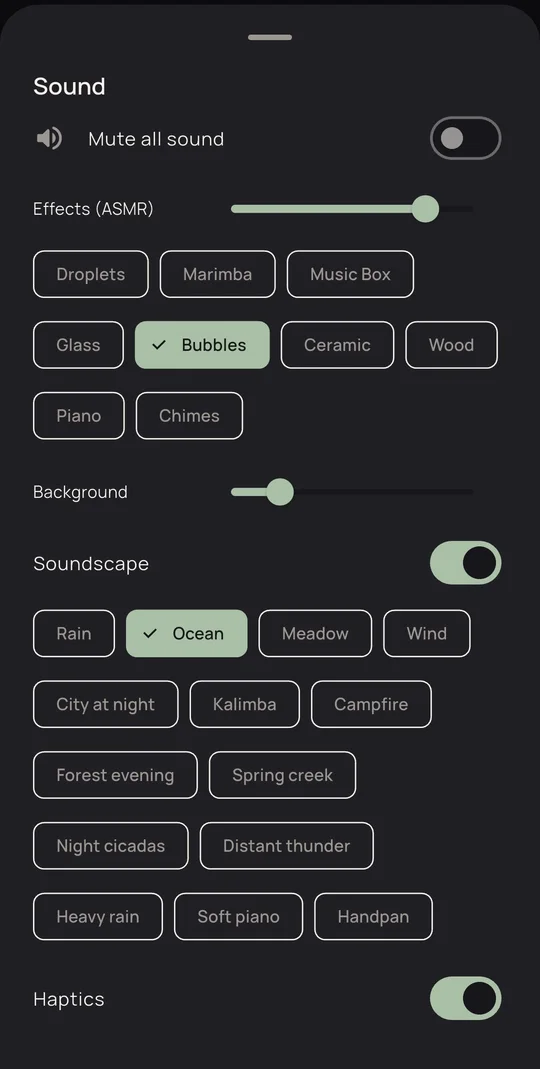
Touch sounds play as you color a field. Background audio sits underneath the session. You can choose and adjust each independently: a quiet tap with more rain, a little ocean with no touch sound, or everything turned down.
The website has short samples taken from the app. Press play to hear them; nothing starts automatically. They are useful for finding the kind of sound you like before installing, though they are excerpts rather than a full coloring session.
Start with a simple pairing
The free sound selection includes Droplets and Marimba for touch sounds, plus Rain and Ocean backgrounds. Premium opens the standard sound collection, including options such as piano notes, music box, campfire and forest evening.
- Begin with the background quiet enough to sit behind the picture.
- Lower or mute touch sounds if repeated notes catch your attention too much.
- Use headphones in shared spaces, and choose a comfortable listening volume.
Listen to the rain and ocean backgrounds
These short audio clips come from Calma Color. Play one to compare the sound before installing; neither starts automatically. Rain and Ocean are included in the free selection. The screenshot shows where sound settings sit in the app.
Sound is optional, and so is vibration
Gentle haptic feedback can add a small physical response to a filled field. Availability depends on your device, and you can switch it off. If you prefer a stiller experience, keep the picture and leave sound and vibration out.
The sounds bundled with the app work offline, along with the bundled illustrations and saved progress. That makes a familiar rain background an option on a train or away from Wi-Fi too. There is no requirement to complete a page before ending the session.
A few useful answers
Does rain audio play automatically on the website?
No. Samples start only when you press their play button. You decide what to listen to.
Do I need Premium for rain sounds?
No. Rain and Ocean are included in the free selection. Premium adds the rest of the standard backgrounds and touch sounds.