A coloring app without sign-up or a login
Sometimes you just want to pick a picture. Calma Color has no sign-up form, password or login screen between you and your first coloring page. Your gallery lives on your device.
Try the coloring demo
Start with a page, not a profile
Open the app, browse the available illustrations and choose one. You do not need to give Calma Color an email address or create a profile. Numbered coloring and free painting are both available without registration.
For a first session, try a short starter page. You can get used to selecting a color and tapping a matching field before choosing something more detailed. Progress saves as you work, so you can come back when you have time.
Local saves have a practical trade-off
Your work stays on the phone or tablet where you made it. That makes the experience straightforward, but it also means there is no Calma account to sign into on another device and recover your gallery.
Your phone's system backup may include app data if you enable it. That depends on your operating system and backup settings. Calma Color does not provide its own gallery sync, and progress does not move between Android and iPhone. Check your backup before changing devices.
Your gallery, saved on your device
My Calma keeps finished pictures together without a Calma login. This screenshot shows the gallery, rather than a cloud account. Before changing phones, check your system backup: restoring Premium alone does not bring back gallery data.
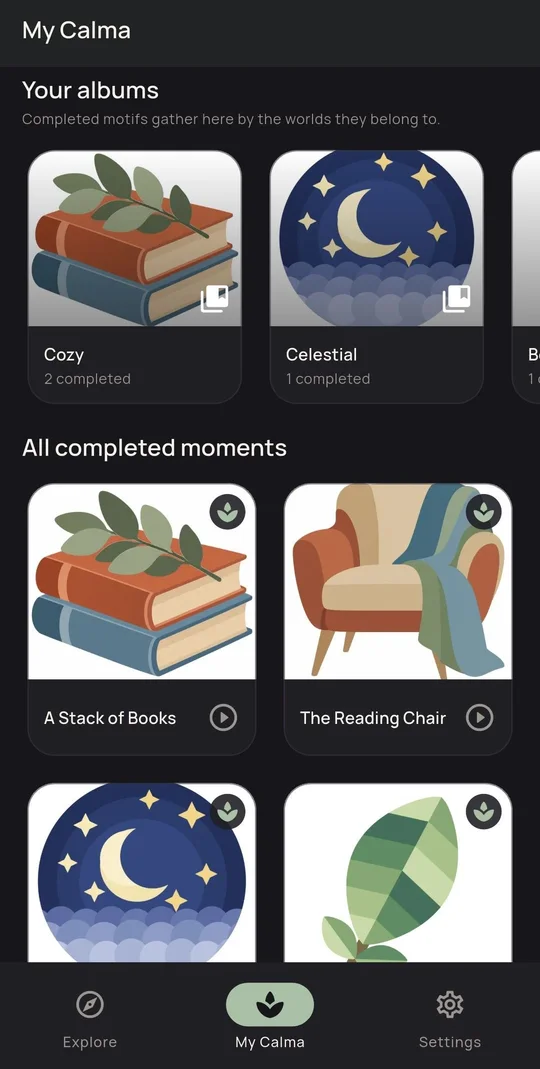
Photo imports and Premium purchases
Creating a coloring page from a photo also needs no Calma account. The conversion happens on your phone, without uploading the original to a server. Your first saved photo page is free; Premium makes saved photo imports unlimited.
A Premium purchase is linked to the store account you use to buy it. To restore it, use the app's restore-purchases option with the same account in the same store. Restoring a purchase restores access to Premium, rather than recovering lost gallery data.
A few useful answers
Does no sign-up mean the app collects no data?
No. Account requirements and data collection are different things. Read the privacy policy for details about technical data, analytics, advertising and your settings.
Can I use the same gallery on my phone and tablet?
Calma Color has no gallery sync of its own. Each device keeps its own local progress; do not rely on a Calma login to move it.